Finance audit trail
The Finance Audit Trail is an immutable, chronological log of every action taken in the Finance module — who created, edited, approved, or deleted any financial record, and when. It is the primary tool for compliance, fraud detection, and investigating discrepancies.
Navigation: Finance → Audit Log
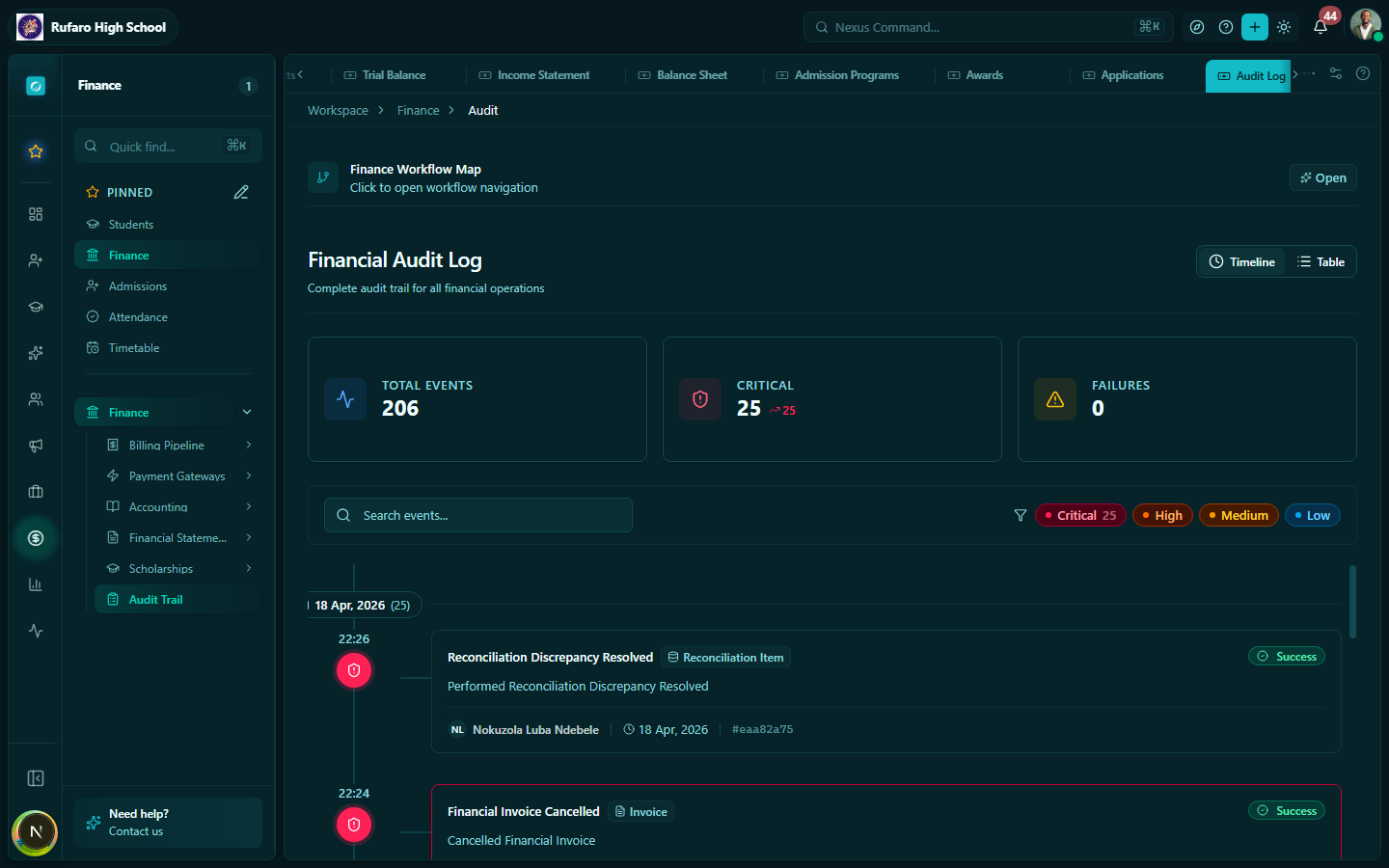
Audit log page
What is tracked?
Every significant action in the Finance module generates an audit entry, including:
| Resource | Tracked actions |
|---|---|
| Fee structures | Created, updated, approved, rejected, archived |
| Payment plans | Created, updated, archived |
| Fee adjustments | Created, updated, deleted |
| Billing runs | Created, confirmed, cancelled |
| Invoices | Created, sent, cancelled, payment recorded, credit note issued |
| Payments | Recorded, voided |
| Receipts | Issued, cancelled |
| Expenditures | Created, submitted, approved, rejected, paid |
| Journal entries | Posted, reversed |
| Bank statements | Imported, reconciled |
| Scholarships | Program created, award granted, award revoked, application approved/rejected |
| Gateway settings | Provider connected, disconnected, API keys updated |
| Receipt templates | Created, updated, set as default |
Reading an audit entry
Each row in the audit log contains:
| Column | Description |
|---|---|
| Timestamp | Exact date and time of the action (to the second) |
| User | Full name and role of the user who performed the action |
| Action | What was done (created, updated, approved, deleted, etc.) |
| Resource type | The type of record affected (Invoice, Payment, Fee, etc.) |
| Resource reference | The specific record ID or number (e.g., INV-2026-001234) |
| Summary | Brief description of what changed |
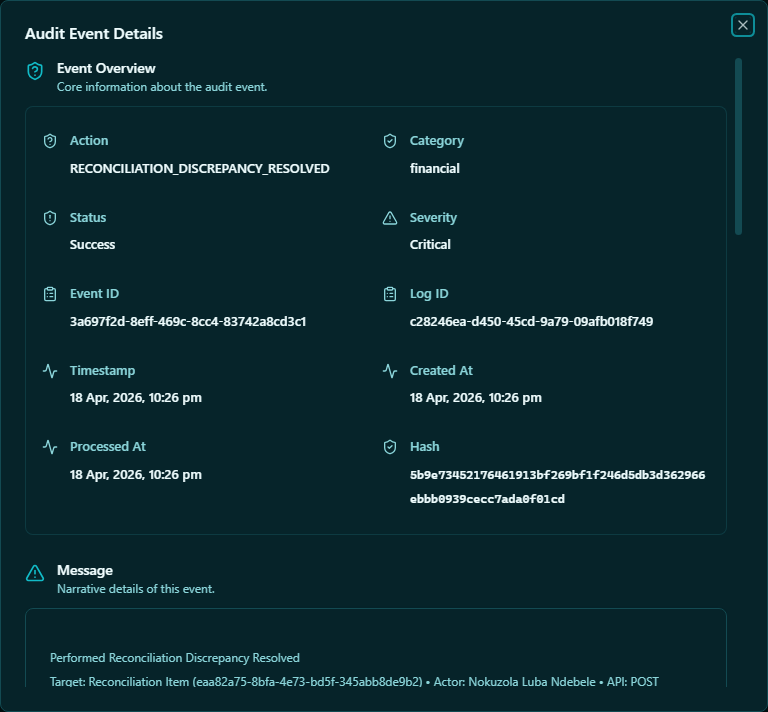
Click the expand icon on any row to see the full detail — including the before and after values for any fields that were changed.
Filtering the audit log
| Filter | Options |
|---|---|
| Date range | Filter by date/time range |
| User | Filter by specific staff member |
| Action | Filter by action type (created, updated, deleted, approved, etc.) |
| Resource type | Filter to a specific module (Invoices, Payments, Fees, etc.) |
| Reference | Search for a specific record (invoice number, payment reference) |
Common audit use cases
Investigating a payment discrepancy
A guardian claims they paid but the system shows no payment:
- Filter by Resource type = Payment and the student name
- Check if a payment was recorded and then voided
- Check when the payment was voided and by whom
- Check the Invoices audit entries for the same invoice to see all status changes
Checking who approved a fee change
A fee amount was changed and you need to know who authorised it:
- Filter by Resource type = Fee Structure and Action = Updated / Approved
- Filter by the date range when the change occurred
- The audit entry shows the old amount, new amount, and the approving user
Pre-audit review
Before an external audit, run the audit log for the full financial year:
- Set the date range to the full year
- Filter to high-risk actions: approved, deleted, voided
- Export and review with your accountant
Exporting the audit log
- Apply your filters
- Click Export → CSV
- The export includes all visible columns plus the full change detail
The export is suitable for sharing with external auditors or the school's governing board.
Compliance and data retention
The audit log is immutable — entries cannot be edited or deleted by any user, including system administrators. Audit records are retained for a minimum of 7 years in line with standard financial record-keeping requirements.
If you need to demonstrate compliance or produce records for a legal or regulatory inquiry, use the audit log export with appropriate date filters and present it alongside your financial statements.