Staff Attendance
The Staff Attendance module gives schools a complete picture of who is present, late, or absent each day. It supports multiple marking methods - from manual entry by administrators to self-service kiosk check-in at the school gate - and exposes live dashboards, filterable logs, and exportable reports.
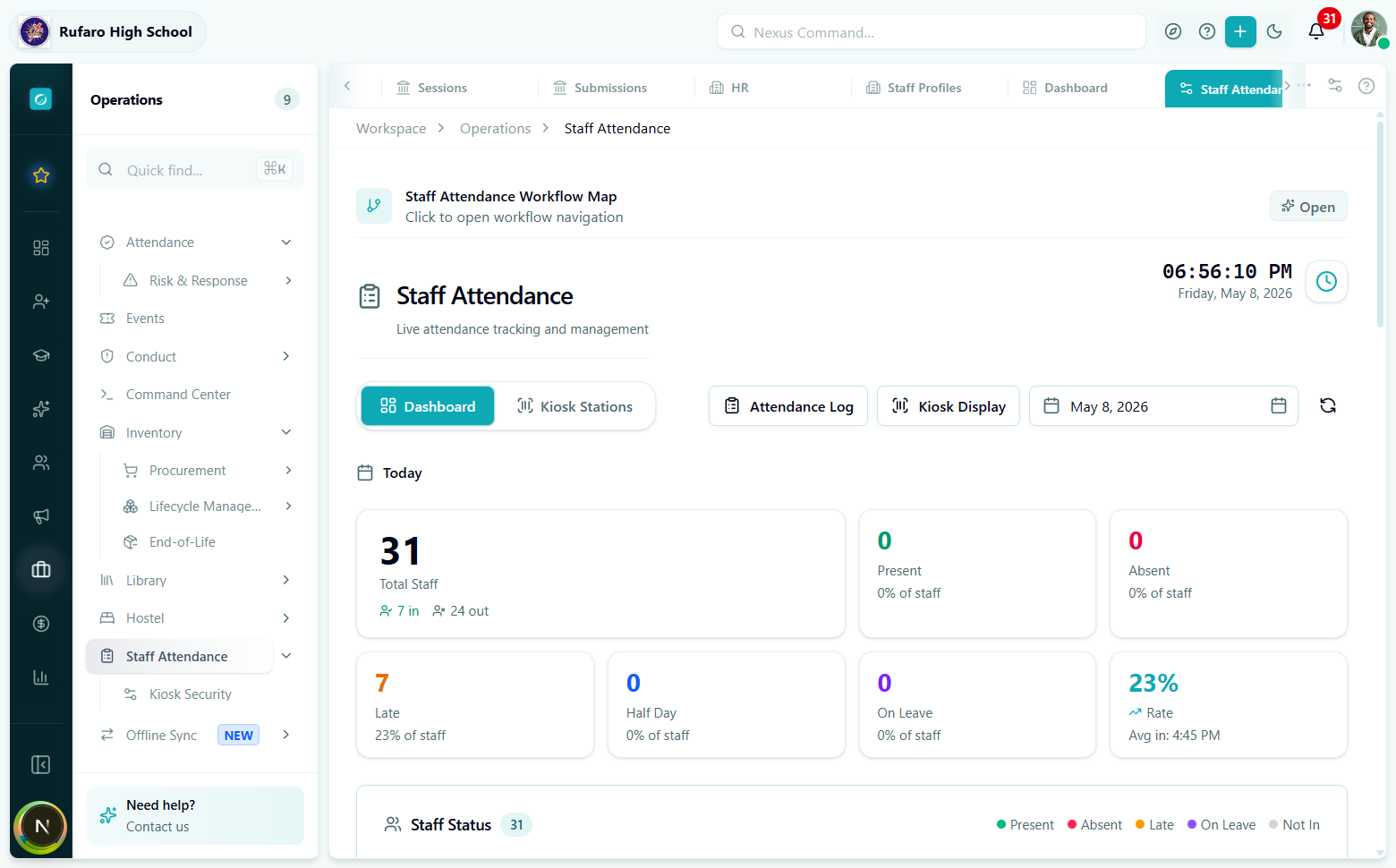
The Staff Attendance workspace. Stat cards update in real time; the tab bar gives immediate access to every sub-section.
Where to find it
Navigate to Operations -> Staff Attendance in the left sidebar.
Operations (sidebar)
  Staff Attendance
    Kiosk Security        <- kiosk station manager
  Offline Sync (NEW)
The module also exposes a shortcut tab bar at the top of every page:
| Tab | URL segment | Purpose |
|---|---|---|
| Dashboard | operations/staff-attendance | Live stat cards + staff status board |
| Kiosk Stations | operations/staff-attendance/kiosk-stations | Create and manage check-in terminals |
| Attendance Log | operations/staff-attendance/log | Search, filter, edit, and verify records |
| Kiosk Display | operations/staff-attendance/kiosk | Full-screen kiosk terminal for gate tablets |
Teachers can also view their own record at Portal -> Teacher Portal -> My Attendance.
Core concepts
Attendance record
Every check-in event produces a StaffAttendanceRecord - one record per staff member per day. A record stores:
- The status (present, absent, late, half day, on leave, holiday, weekend)
- The marking method (how the record was created)
- Check-in / check-out times and computed
totalHoursWorked - Optional leave type when the status is
on_leave - Whether the record has been verified by a supervisor
Attendance status
| Status | Meaning |
|---|---|
present | Staff checked in on time |
late | Checked in after the school's threshold time |
half_day | Present for only a partial working day |
absent | No check-in; not on authorised leave |
on_leave | Authorised leave (annual, sick, maternity, etc.) |
holiday | School holiday - no attendance expected |
weekend | Weekend - no attendance expected |
Marking methods
| Method | How it works |
|---|---|
manual | Administrator types in the record via the Attendance Log |
app | Staff member uses the self check-in card on the web app |
biometric | Fingerprint scanner connected to the kiosk station |
rfid | RFID card tap at the kiosk |
barcode / face_recognition | Barcode scan or face recognition at the kiosk |
Leave types (when on_leave)
annual · sick · maternity · paternity · unpaid · study · compassionate
Record lifecycle
Once a record is verified it is locked - only users with manage permission on staff_attendance can update it thereafter.
Pages in this section
| Page | What it covers |
|---|---|
| Dashboard | Reading the live dashboard and staff status board |
| Recording Attendance | Manual entry, self check-in, and bulk marking |
| Attendance Log | Searching, filtering, verifying, and editing records |
| Kiosk Setup & Display | Creating stations, rotating tokens, and running the kiosk terminal |
| Teacher Self-Service | How teachers view and check in from their own portal |
| Reference | All API endpoints, hooks, and type definitions |