Session Management
A Registration Session is the container for a data-collection campaign. You create one per school (or per class/grade where appropriate), configure what data is required, generate codes, and then open it when you are ready for participants to submit.
Session lifecycle
| Status | Participants can submit? | Staff can edit session? |
|---|---|---|
draft | No | Yes |
open | Yes | Limited |
paused | No | Limited |
closed | No | No |
archived | No | No |
Creating a session
Navigate to Foundation -> Self-Service Registration -> Sessions -> New Session.
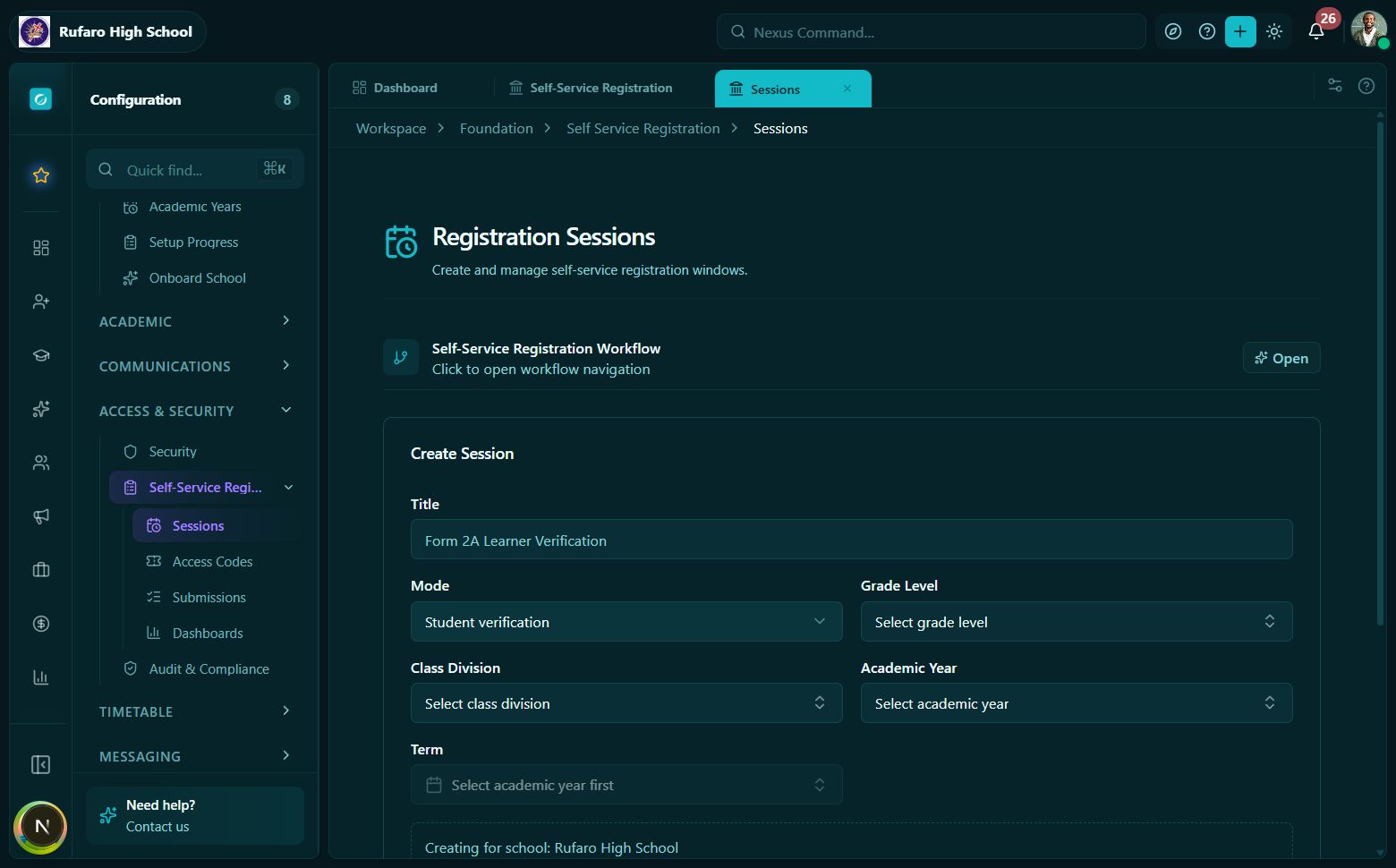
The New Session form. Select a mode first - it controls which fields are required and what the participant form will look like.
Required fields
| Field | Type | Notes |
|---|---|---|
mode | enum | teacher_self_registration, student_intake, or student_verification |
schoolId | UUID | The school this session belongs to |
title | string | Displayed to participants on the registration form |
Optional configuration
| Field | Type | Purpose |
|---|---|---|
description | string | Shown on the public form below the title |
classDivisionId | UUID | Locks all participants to one class division |
gradeLevelId | UUID | Locks all participants to one grade level |
academicYearId | UUID | Associates submissions with a specific academic year |
termId | UUID | Associates submissions with a specific term |
startsAt | ISO datetime | When the session automatically becomes available (informational) |
endsAt | ISO datetime | Deadline shown to participants |
expectedCount | number | Used for progress percentage calculations |
rosterPolicy | enum | Controls who can be assigned a code (see below) |
requiredFields | JSON object | Field-level validation rules |
approvalPolicy | JSON object | Approval workflow configuration |
Roster policies
| Policy | Meaning |
|---|---|
preloaded_only | Codes may only be assigned to people already on the roster |
open_with_code | Any code holder can submit (open intake) |
mixed | Some codes are pre-assigned; unassigned codes remain open |
Scoping a session
School-wide session (no class/grade lock)
Leave classDivisionId and gradeLevelId blank. Any participant with a valid code can submit. This is typical for teacher self-registration where teachers self-select their subjects and classes.
Grade-locked session
Set gradeLevelId only. All participants are placed in that grade; the class division field on the public form may remain open for them to choose.
Class-locked session
Set classDivisionId. Both the grade and the class are locked - the system derives the gradeLevelId from the class division automatically. Participants cannot change their placement.
When classDivisionId is set on a session, the public registration form disables the grade and class dropdowns. The selectionContext still returns the full list of classes for other UI purposes, but the locked IDs are enforced server-side on every save and submit.
Session transitions
Session detail view: the status badge shows the current lifecycle state. Action buttons (Open / Pause / Close / Archive) appear according to valid transitions.
- Open
- Pause
- Close
- Archive
Call Open session (or use the status action button in the session detail view). Only sessions in draft or paused status can be opened.
Participants can now enter their codes at /register and begin submitting.
API: POST /registrations/sessions/{sessionId}/open
Hook: useOpenRegistrationSession()
Pausing a session temporarily prevents new submissions while keeping existing drafts intact. Use this during school holidays or when you need to review before re-opening.
API: POST /registrations/sessions/{sessionId}/pause
Hook: usePauseRegistrationSession()
Closing ends the submission window. Participants who have started but not submitted will no longer be able to save or submit. Only open or paused sessions can be closed.
API: POST /registrations/sessions/{sessionId}/close
Hook: useCloseRegistrationSession()
Archive a closed session after all submissions have been processed. Archived sessions remain visible for reporting but cannot be re-opened.
API: POST /registrations/sessions/{sessionId}/archive
Hook: useArchiveRegistrationSession()
Editing a session
You can update title, description, startsAt, endsAt, expectedCount, requiredFields, and approvalPolicy at any point before closing. The mode and schoolId fields are immutable after creation.
API: PATCH /registrations/sessions/{sessionId}
Hook: useUpdateRegistrationSession()
Session progress summary
Progress panel on the session detail view. The bars update in real time as participants submit and staff approve.
Every session exposes a live RegistrationProgressSummary attached to the session object (or via the dedicated progress endpoint). Key fields:
| Field | Description |
|---|---|
expectedCount | Total participants expected |
codesGenerated | How many codes have been issued |
unused | Codes not yet started |
started | Codes where the participant has begun but not submitted |
submitted | Awaiting staff review |
needsCorrection | Sent back to participant |
approved | Accepted and imported |
rejected | Rejected by staff |
imported | Successfully written to the roster |
completionPercent | (submitted + approved + imported) / expectedCount * 100 |
approvalPercent | approved / submitted * 100 |
API: GET /registrations/sessions/{sessionId}/progress
Hook: useRegistrationSessionProgress(sessionId)
Listing sessions
Use the sessions list with optional filters:
const { data } = useRegistrationSessions({
  mode: "student_intake",
  status: "open",
});
For a tenant-wide view (across all schools), pass tenantWide: true:
const { data } = useRegistrationSessions({}, { tenantWide: true });
API quick reference
| Operation | Method + Path | Hook |
|---|---|---|
| List sessions | GET /registrations/sessions | useRegistrationSessions() |
| Get session | GET /registrations/sessions/{id} | useRegistrationSession(id) |
| Create session | POST /registrations/sessions | useCreateRegistrationSession() |
| Update session | PATCH /registrations/sessions/{id} | useUpdateRegistrationSession() |
| Open | POST /registrations/sessions/{id}/open | useOpenRegistrationSession() |
| Pause | POST /registrations/sessions/{id}/pause | usePauseRegistrationSession() |
| Close | POST /registrations/sessions/{id}/close | useCloseRegistrationSession() |
| Archive | POST /registrations/sessions/{id}/archive | useArchiveRegistrationSession() |
| Progress | GET /registrations/sessions/{id}/progress | useRegistrationSessionProgress(id) |